Remote work, distributed teams, and cloud-based systems have permanently changed how Canadian small businesses operate. Whether you’re supporting internal staff, external clients, or multiple branch locations, remote support software is no longer optional, it’s foundational.
Downtime remains one of the most expensive hidden costs for small businesses. Studies estimate that IT downtime costs SMBs hundreds of dollars per minute, while unresolved technical friction leads to lost productivity, employee frustration, and customer churn. Yet many organizations still rely on ad-hoc support methods: phone calls, screen sharing tools with limited security, or costly enterprise software that’s overkill for their needs.
This is where Zoho Assist stands out.
In this in-depth blog, we’ll explore:
- What Zoho Assist is and how it works
- Which professionals and industries benefit most
- Why Canadian businesses are adopting it over competitors
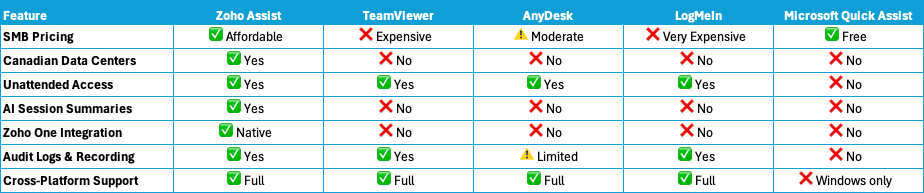
- How Zoho Assist compares to TeamViewer, AnyDesk, LogMeIn, and Microsoft Quick Assist
- The role of automation, AI (Zia + ChatGPT), and the Zoho One ecosystem
- How blueCaribou Software Solutions helps businesses implement and optimize Zoho Assist
If you’re evaluating remote support solutions for education, finance, IT services, or non-profit organizations in Canada, this article will help you make a confident, future-proof decision.
What Is Zoho Assist?
Zoho Assist is a cloud-based remote support and remote access platform that allows businesses to securely connect to computers and mobile devices anywhere in the world, without complex setup or expensive infrastructure.
Unlike basic screen-sharing tools, Zoho Assist is purpose-built for professional IT support, customer service, and internal help desks.
Core Capabilities
- On-demand remote support (attended sessions)
- Unattended access to servers, kiosks, and staff computers
- Cross-platform support (Windows, macOS, Linux, iOS, Android)
- Secure file transfer and clipboard sharing
- Multi-monitor navigation
- Session recording and audit logs
- Custom branding and white-labeling
- Browser-based technician console
Because Zoho Assist is cloud-native, technicians can launch sessions directly from a browser, no VPNs, no firewall reconfiguration, and no heavy client installs.
Who Zoho Assist Is Built For
Zoho Assist isn’t just for IT departments. It delivers productivity gains across multiple roles.
IT & Help Desk Teams
- Resolve issues faster without traveling onsite
- Support multiple users across provinces
- Reduce backlog and response times
- Maintain security and compliance with audit trails
Sales & Customer Success
- Run live product walkthroughs
- Assist prospects during trials
- Support onboarding without scheduling meetings
- Log sessions directly into CRM records
Marketing & Operations
- Get immediate help with CMS, analytics, or design tools
- Reduce downtime before campaigns and launches
- Collaborate visually instead of troubleshooting by email
Executives & Business Owners
- Securely access office systems while traveling
- Maintain continuity during emergencies
- Reduce dependency on physical IT presence
Industry Use Cases (Canada-Focused)
Education (K-12, Colleges, Training Providers)
- Support distributed classrooms and labs
- Assist teachers and staff remotely
- Minimize disruptions to online learning
- Protect student data with encrypted sessions
Finance & Accounting
- Securely assist staff and clients with accounting systems
- Maintain compliance with Canadian data residency
- Record sessions for audit purposes
- Reduce delays during tax season and reporting cycles
IT Services & MSPs
- Deliver scalable remote support to multiple clients
- Brand the support experience
- Integrate with ticketing and billing systems
- Increase technician efficiency without adding headcount
Non-Profits
- Stretch limited IT budgets
- Support remote volunteers and staff
- Reduce reliance on onsite IT
- Maintain secure access to donor and operational data
The Hidden Cost of Not Using Remote Support Software
Without a dedicated solution like Zoho Assist, businesses often experience:
- Slow issue resolution and prolonged downtime
- Frustrated employees and reduced morale
- Lost customers due to delayed support
- Increased travel and outsourcing costs
- Poor documentation and knowledge loss
- Security risks from password sharing or shadow IT
Remote support isn’t just about fixing computers, it’s about protecting productivity, reputation, and revenue.
Key Advantages of Zoho Assist
1. SMB-Friendly Pricing
- Zoho Assist offers transparent, flexible pricing that scales with your team, without forcing enterprise contracts.
- Compared to competitors like TeamViewer and LogMeIn, Zoho Assist consistently delivers lower total cost of ownership.
2. Ease of Use
- Launch sessions in seconds
- No complex setup for end users
- Clean, intuitive interface
- Minimal training required
3. Enterprise-Grade Security (With Canadian Data Residency)
- AES-256 encryption
- TLS-secured sessions
- Multi-factor authentication
- Role-based access controls
- Session recordings and audit logs
- Canadian data centers (critical for finance, education, public sector)
4. Deep Integrations
- Zoho Assist integrates seamlessly with:
- Zoho Desk
- Zoho CRM
- Zoho Projects
- Zoho Books
- Zoho Analytics
- Slack, Microsoft Teams, ServiceNow, Zendesk
- Zapier (1,000+ apps)
This allows remote support to become part of a connected business workflow, not a siloed tool.
Automation & AI: Zia + ChatGPT
Zoho Assist is one of the few remote support platforms actively integrating AI.
What AI Enables
- Automatic session summaries (ChatGPT)
- Suggested chat responses during sessions
- Language translation and rephrasing
- Faster documentation and reporting
- Reduced administrative overhead
AI turns remote support from a reactive task into a scalable, insight-driven process.
What’s New (Why This Is Big for Canada)
Zoho Assist’s availability in Canadian data centers is a major milestone.
For Canadian businesses, this means:
- Data residency compliance
- Reduced latency
- Alignment with PIPEDA and provincial regulations
- Greater trust for regulated industries
Additional recent enhancements include:
- Co-browse for web-based support
- Enhanced mobile device support
- Improved Linux auditing
- Session-level recording controls
Comparison Table: Zoho Assist vs. Competitors
Practical Tips for SMBs
- Deploy unattended access on servers and shared devices
- Integrate Zoho Assist with your help desk or CRM
- Enable AI summaries to reduce admin time
- Use branding to build client trust
- Review session reports monthly to identify patterns
- Combine Zoho Assist with Zoho Books for billable support
Why Zoho Assist Is Stronger Inside Zoho One
Zoho Assist becomes exponentially more powerful when paired with:
- Small business accounting software (Zoho Books)
- Financial management and invoicing solutions
- CRM-driven customer support
- Analytics-based reporting
No competing remote support vendor offers this level of native business integration.
How blueCaribou Software Solutions Helps
blueCaribou Software Solutions helps Canadian SMBs:
- Select the right Zoho Assist licensing
- Implement secure configurations
- Integrate with Zoho One or third-party tools
- Train teams on best practices and AI usage
- Migrate from TeamViewer or LogMeIn
- Optimize workflows for long-term scalability
As a Canadian Zoho Partner, blueCaribou aligns technology with local compliance, operational reality, and growth goals.
Final Thoughts & Next Steps
Remote support is no longer just an IT tool, it’s a business continuity strategy.
Zoho Assist gives Canadian small businesses:
- Enterprise-grade security
- AI-driven efficiency
- Seamless integrations
- Predictable pricing
- A future-ready platform
If you’re ready to modernize your support operations:
- Try Zoho Assist
- Book a consultation with blueCaribou Software Solutions
- Explore more insights at https://www.mybcss.com/blogs/
Your business deserves faster support, happier teams, and smarter systems, Zoho Assist delivers all three.